Buyer information, not installation instructions. Requirements depend on the adopted local code and exact product. Electrical work and site diagnosis should be performed by qualified professionals.
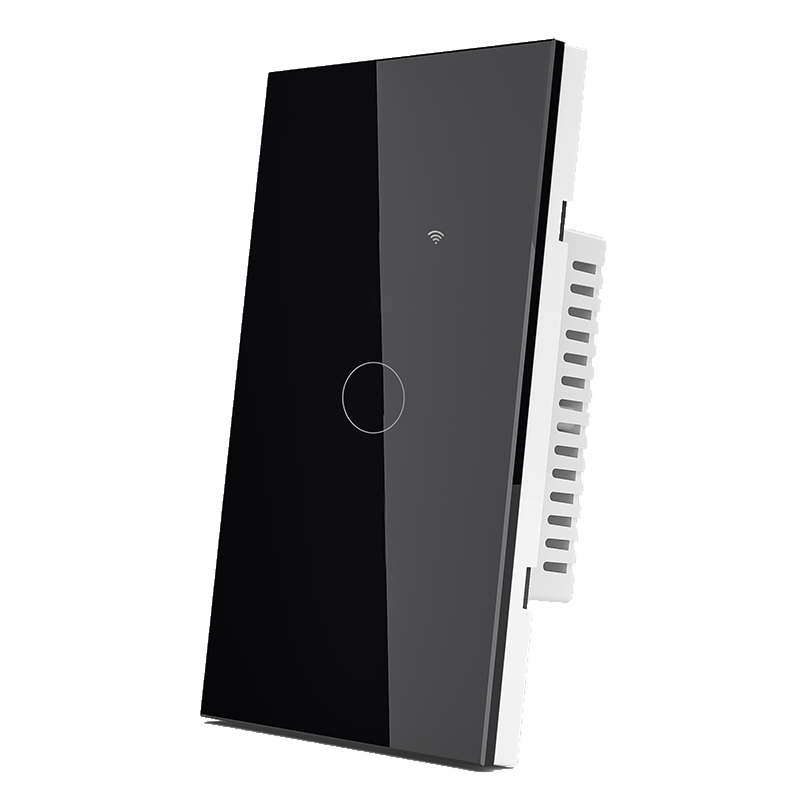
Choose the control function and the system that will operate it, then match the switch to the wiring and wall box. FAHINT offers touch-only, Wi-Fi and Zigbee configurations; each needs a different sample brief.
Choose the control mode
| Control mode | What the selection means | What to establish with the sample |
|---|---|---|
| Touch only | A local touch control; network functions are not stated for the touch-only configuration. | Required switching function, load compatibility and local operation |
| Wi-Fi + touch | A Wi-Fi control configuration as well as a touch interface. | Supported network, exact app, account setup, remote features and behavior if connectivity is lost |
| Zigbee + touch | A Zigbee control configuration as well as a touch interface. | The intended coordinator or gateway, app and required functions with that system |
Zigbee is a low-power mesh networking protocol, as described by the Connectivity Standards Alliance. Compatibility still depends on the switch, gateway and requested features. Name the intended system in the inquiry. [Source]
For several rooms, decide who will set up accounts and maintain access. Local switching, scheduling and remote operation should each be demonstrated if they are part of the requirement.
Match the complete model to the wiring
USW8811 requires neutral and live conductors; USW8811-S is the single-live version. Their similar appearance makes the suffix important on the order and sample label. The examples below all specify 50/60Hz operation.
| Model | Control / face format | Published supply | Wiring requirement |
|---|---|---|---|
| UST8811 | Touch only / US glass panel | 110–240V AC · 50/60Hz | Single live wire |
| USW8811 | Wi-Fi + touch / US glass panel | 90–250V AC · 50/60Hz | Neutral required (N + L) |
| USW8811-S | Wi-Fi + touch / US glass panel | 110–240V AC · 50/60Hz | Single live wire |
| EUZ8811C | Zigbee + touch / EU glass panel | 160–240V AC · 50/60Hz | Single-live or neutral + live (L / N + L) |
US and EU identify catalog face formats, not destination-market approval or wall-box fit. Have the electrician confirm the available conductors and review the exact model diagram, minimum-load requirements and any bypass accessory.
Select the load function and physical fit
The table covers switching. Dimming, curtain motors, fans and heaters need controls approved for their function and load. Send the lamp, driver or motor model with its electrical rating.
A maximum wattage alone cannot establish compatibility with an LED driver or motor. Review the permitted load type and evaluate the intended equipment with the selected control.
Use the exact rear-housing drawing and mounting details to check wall-box space. The catalog includes different body versions behind similar glass panels.
USW8841-Z has four controlled outputs in a US-format Zigbee touch panel. Its four-gang description refers to those outputs, not the size of the wall box.
Evaluate the intended system
Record the switch, app version, gateway or coordinator, network and connected load with the sample. A useful acceptance check includes:
- Local operation and every requested app or remote function.
- Pairing, reset, account handover and re-pairing.
- Recovery after power loss and behavior without connectivity.
- Load performance assessed by a qualified professional.
- User access and removal or transfer of access for shared premises.
- The accepted hardware, software and accessories.
Keep this record for repeat orders. Changes to firmware, the gateway or the connected load may require another compatibility review.
Prepare the quotation brief
- Complete model, suffix, quantity and destination market.
- Control function, number of outputs and intended load.
- Supply voltage, wiring arrangement and approved body drawing.
- Protocol, app, gateway and required features.
- Panel finish, accessories, pack contents and authorized artwork.
- Required documents, sample acceptance criteria and delivery date.
If the wiring or connected system is still undecided, send those requirements with the inquiry. We can review the configuration before confirming samples and order timing.
What each control mode needs beside it
The letters in the model designation tell you how the device talks to the rest of the room. Wi-Fi models (the USW and EUW ranges) join the site network directly and need nothing else to switch. Zigbee models (USZ and EUZ) need a compatible gateway on site, and a gateway is a separate purchase that belongs on the same quotation. Touch-only panels carry no radio at all: they switch, they do not appear in an app, and no gateway makes them do so.
Wiring is a second, independent axis. Neutral-required, single-live and dual-wiring versions are separate catalogue configurations, not options on one board. A wiring diagram from one configuration does not transfer to another, and a project that changes its mind after sample approval has to reopen the sample.
Gang count is the third. A US 4-gang panel is one device controlling four circuits in one frame; it is not four devices. Retail buyers confuse the two because the box looks the same. Match the gang count to the plate opening and the frame, then check the finish across the whole bank of panels on the same wall.
When a requirements note arrives, we look for protocol, function (switching, dimming, curtain, fan or heater), neutral availability, US or EU format, gang count and the load behind each gang. Those six answers decide the model; the app, gateway and frame are then quoted as separate lines so nothing is assumed.
Sources & further reading
Reviewing a specific model?
Send the model and the question you want to resolve. We will help locate the relevant product information.
Ask a product question